
How to get more Google reviews for your flower shop
Make it easy for customers to leave you a review. Set up your Google review link, and provide invitations for delivery and pickup.
By Daniela Marquez
Take a birthday delivery: a daughter in Denver orders tulips for her mom in Ohio. The daughter knows whether ordering felt easy and the delivery happened as promised. Her mom knows what arrived at the door and how the flowers looked on the kitchen table.
One order. Two different experiences worth hearing about.
Those details can help the next customer choose your shop, especially when they're sending flowers somewhere they can't visit. Reviews give them other customers' experiences to draw on. Your invitation opens the door to those stories.
For delivery orders, start with one email for the sender, one card for the recipient, and one person on your team keeping track. For pickup and walk-in purchases, let the invitation to review travel home with the flowers. Here's how to build that routine around the service that makes your shop worth talking about. Hint: you're probably already giving customers something to talk about. Give them a little encouragement to share it.
Give people something worth writing about
Before you print a review card, think about what a customer would tell a friend about your shop.
The flowers belong in that story. So does the call that catches a missing apartment number before the driver leaves. Or the extra stem tucked into a bouquet. Or the patient conversation that helps a customer choose flowers for an occasion they don't quite know how to handle.
To find your shop's version, start with what people already thank you for:
- The thoughtful extra. An extra flower or an occasional mini bouquet can be a lovely surprise. Choose a gesture that fits your margins and feels like your shop.
- The detail you catch. A confirmation call about an address, delivery window or important preference can give a distant sender one less thing to worry about.
- The useful service after the flowers go home. Clear care advice or a convenient vase return program can make the experience last beyond the handoff.
- The way you welcome people back. An ordinary customer discount can be part of how you look after regulars, with clear terms available independently of reviewing.
A vase program deserves a little thought. Buying back accepted vases, refunding deposits, exchanging containers and offering store credit are different arrangements. Choose the one you can run well and explain exactly how it works.
You don't need to add an expensive extra to every order. Look for the care your team can sustain on a quiet Tuesday and on the Saturday before Mother's Day.
Ask your team: What do customers thank us for beyond the flowers? Then choose one answer to make a consistent habit. Decide when it applies, who owns it and what a good version looks like. If it's a confirmation call, be clear about which details need checking. If it's a mini bouquet, set a budget you can keep.
One firm boundary: the service stays the same whether the customer reviews you or never does. No extra stem, vase refund, discount or other benefit in exchange for a review. Google prohibits review incentives.
Give customers an experience worth describing. Leave the words to them.
Give customers a direct way to review your shop
Save your Google review-request link once, then use it wherever you've chosen to invite feedback. The clickable link belongs in email. The QR code belongs on the card.
On a computer browser:
- Sign into the Google Account that manages your shop's Business Profile. Open the correct shop and check the location if you have more than one.
- Select Read reviews, then Get more reviews.
- Select Copy to save the review-request link somewhere your team can find it.
- Right-click the displayed QR code and choose Save image as… to download it.
- Open the copied link and check that it leads to reviewing the correct shop. Check the QR destination before putting it into print.
Google's current instructions provide QR generation on computer browsers. Use that help page if the menu wording on your screen differs.
Check that you've saved the invitation to write a review, rather than a link to an existing customer's review. Customers will need to sign into a Google Account, which can use a non-Gmail email address.
Delivery: one invitation for the sender, another with the flowers
Back to the birthday tulips. You have the daughter's email because she placed the order. The card accompanying the flowers gives you a way to reach her mom, without collecting another email address.
Both can describe a genuine experience. Give each an invitation that makes sense where they'll find it.
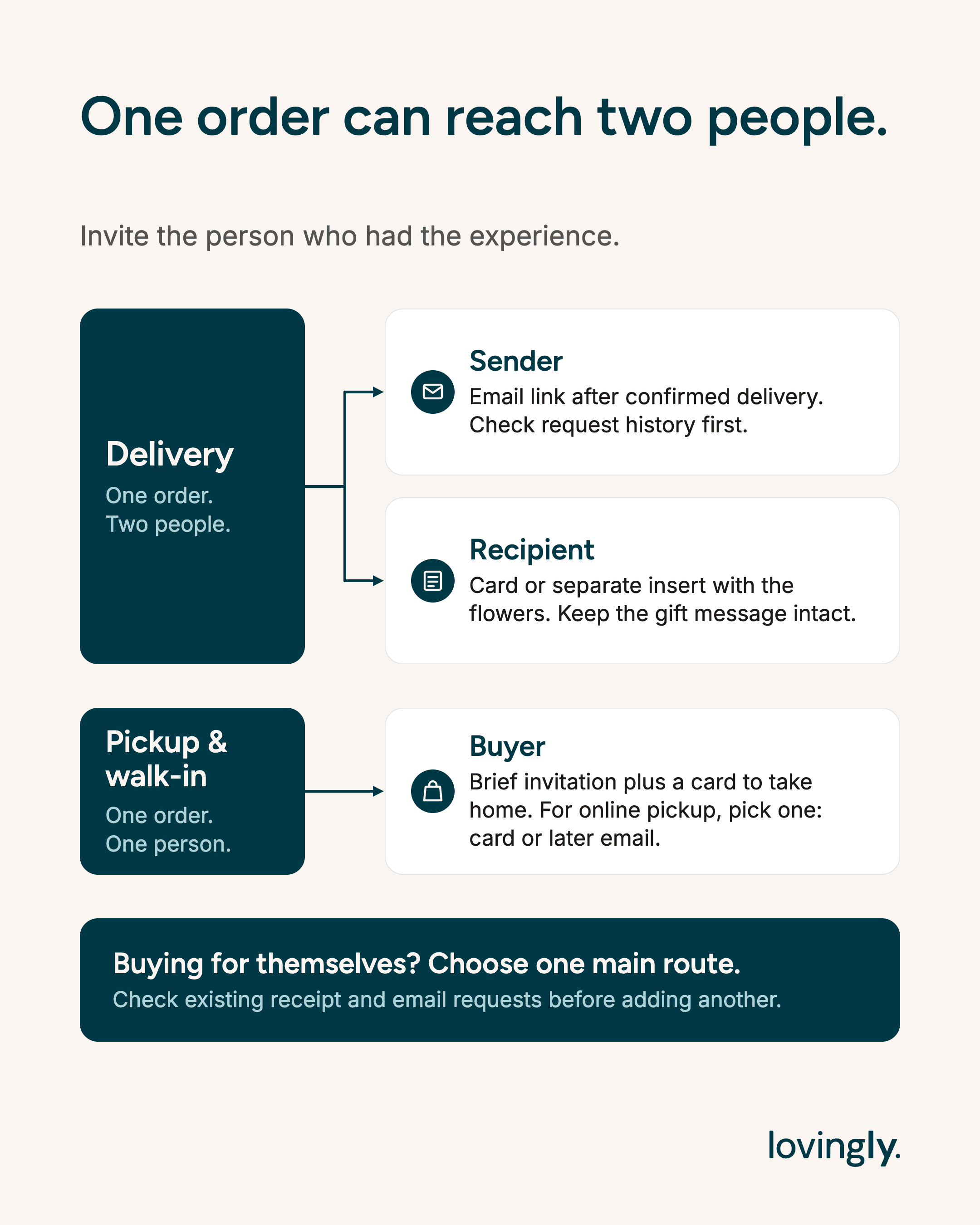
- Purchaser or sender: Email a clickable review link after confirmed delivery.
- Recipient: Include a care card, separate insert or tag with the flowers.
- Someone buying flowers for themselves: Choose the email or printed invitation as the main request, so one person isn't asked twice.
Send the purchaser a short email after delivery
For a simple manual routine, check the previous day's confirmed deliveries each morning. Send your invitation after the service has happened, then adjust the timing as you learn what fits your customers.
If you already send a suitable post-delivery email, put the invitation there. Make it part of a useful message instead of adding another one to the inbox.
Example purchaser email
Subject: Thank you for choosing [Shop name]
Hi [First name],
Thank you for trusting us with your flower delivery. Would you share your experience in a Google review? Your feedback can help the next person choosing a flower shop.
Leave a Google review
Thank you,
[Shop name]
Link “Leave a Google review” directly to your shop's request page. Someone reading on their phone should be able to tap and continue. Replace the bracketed shop and customer details before use; all invitations in this guide are illustrative examples.
Use confirmed delivery as your trigger. An arrangement photo can show the sender what you made, but a photo taken at the workbench doesn't tell them the flowers arrived. If photos are already part of your service, keep sending them for their own useful purpose.
Put the recipient's invitation where they'll find it
The recipient may never see the email receipt. Put a short invitation on the care card, a separate insert or a visible tag that stays with the arrangement as it's unwrapped.
Keep the sender's gift message intact. Your invitation has its own job and its own space.
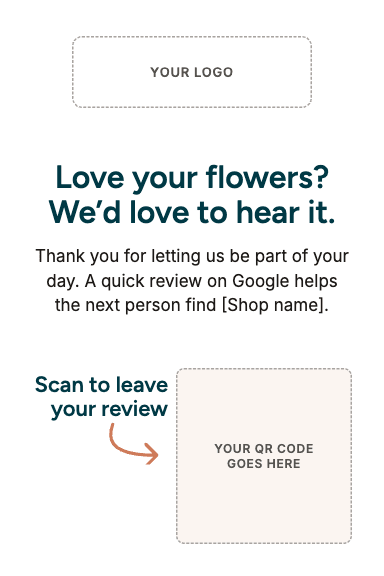
Example recipient insert
Flowers from [Shop name]
We'd love to hear about your experience. Scan to share an honest Google review whenever it suits you.
Place the real review QR code beside the invitation. If the card also has a care link, label each destination clearly. The recipient should be able to find the care advice and choose whether to review.
The flowers have carried your work into someone's home. Let the invitation travel with them.
Match the occasion
After a wedding or event, give the customer time to experience the day before asking. For sympathy orders, use a quieter approach: for example, leave review language off the recipient insert and follow up with the purchaser later.
Set that approach by occasion, rather than by who you expect will give a positive rating. That keeps the request thoughtful and consistent.
Pickup and walk-in: let the invitation travel home
A customer collecting a bouquet may have a birthday dinner to get to. They've paid, you've handed over the flowers, and they're checking where they put their car keys. Keep the invitation easy.
Example spoken invitation
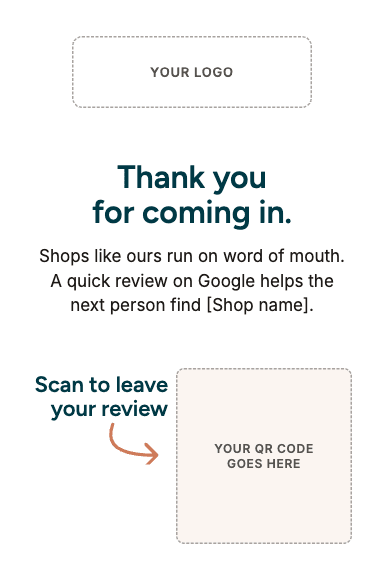
“Thank you for coming in. There's a Google review code on the card if you'd like to share your experience later.”
Then let them go.
A care card, receipt or take-home insert gives them access when they have time. For a walk-in customer without an email address on file, that can be your whole process.
Example take-home wording
Thank you for visiting [Shop name]
We'd love to hear about your experience. Scan to share an honest Google review whenever it suits you.
For online pickup, choose the printed invitation or a later purchaser email as your main request. That keeps one collection from producing a review receipt, another card and an automated follow-up all aimed at the same person.
If someone else collects the order, keep the roles straight. The purchaser gets any purchaser follow-up; the recipient insert travels with the flowers. The collector can review their own experience, but doesn't stand in for the person who ordered or received the gift.
The counter QR question
A small QR display can give customers another way to find your review page. Google expressly includes printed in-store codes in its guidance. Its policy prohibits requiring or pressuring customers to review on the premises. Offer access, then leave the timing to them. Read Google's policy.
In a September 2026 Sterling Sky report, Claudia Tomina noted a possible pattern involving on-site reviews, QR codes and clustered submissions across five businesses. She called the explanation an assumption. That observation doesn't establish a cause or a tested workaround for Google's filtering.
Print one before you order the stack
A good review card needs three things: your shop's name, a short invitation and a QR code people can scan. Your colors and illustration can make it feel like your shop. Give the code room to do its job.
Keep it clear of folds, moisture and busy artwork. Preserve its proportions and blank border. For a standard QR code, DENSO WAVE specifies a margin four small code squares wide on every side.
Before ordering a stack:
- Print a sample at the final size on the material you plan to use.
- Scan it with more than one phone in ordinary lighting.
- Confirm that it opens the correct shop and offers a way to write a review, allowing for Google's sign-in step.
- Check the small text and the code after any folds or cuts.
- Repeat after changing the code, its size or the layout.
If scanning is awkward, give the code more room, use stronger contrast or simplify the design. Your finished sample is the useful test of size and legibility.
Want more design control?
Canva: Design the whole insert and place your saved Google QR image in it. Or use Canva's own Static QR codes app to create a code from your review link. Check the selected app, design assets and download options for any charges.
QRCode Monkey: Its static URL generator offers colors, shapes, logo uploads and PNG or vector downloads. Paste your Google review-request link into the URL field, create the code and download your chosen format. The free static option is separate from paid statistics and editability features. Run customized codes through the same print test.
For a simple setup, use a static code that points directly to Google's request link. Its destination is fixed, so replacing that destination means creating and printing a new code. A dynamic service can change the destination through a redirect, with possible account or subscription costs.
Keep the request open to honest feedback
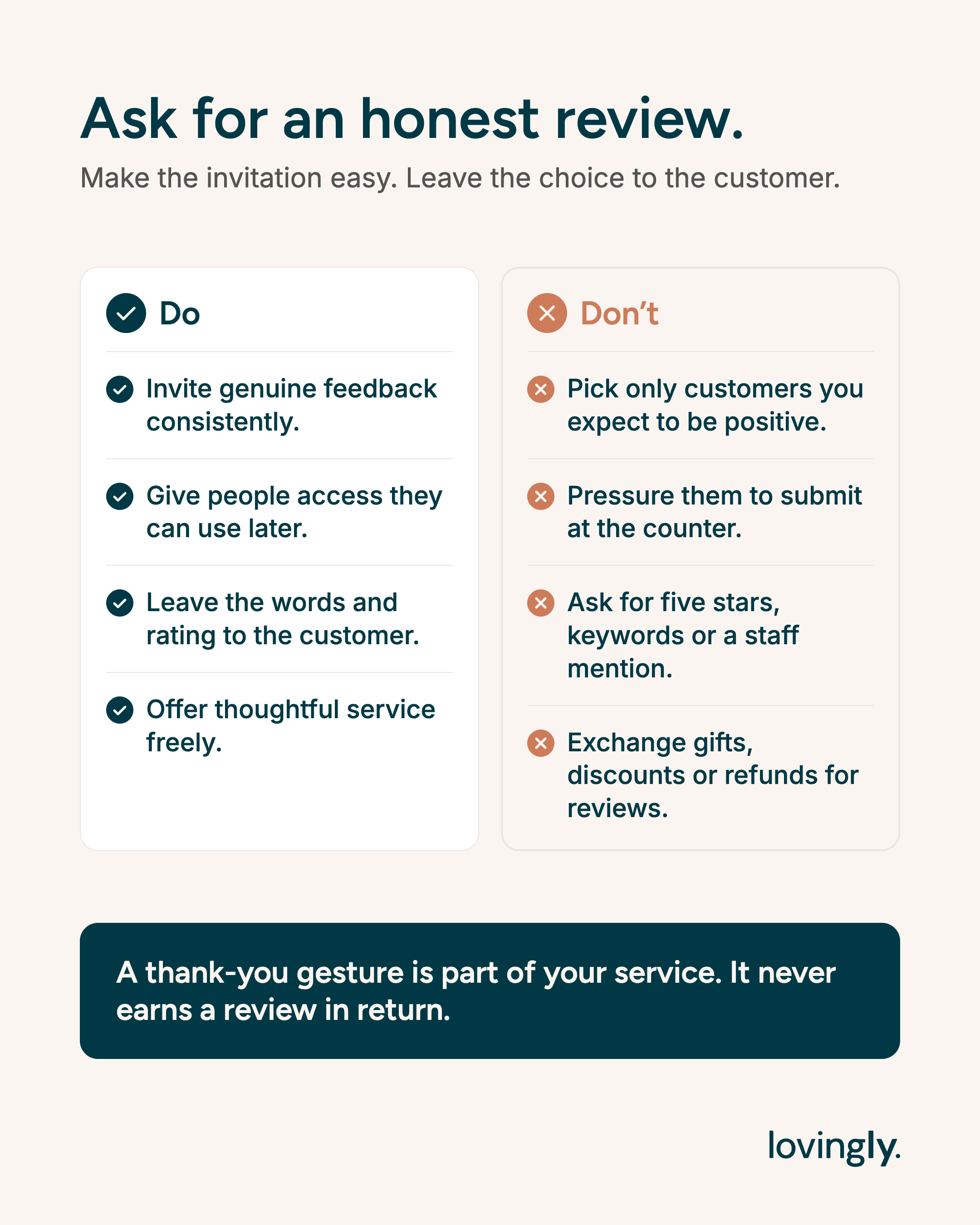
These are the Google policy boundaries to build into your routine:
- Invite genuine feedback consistently. Don't select only customers you expect to be positive.
- Give people access they can use later. Don't pressure them to submit at the counter.
- Leave the words and rating to the customer. Don't ask for five stars, keywords or a staff mention.
- Offer thoughtful service freely. Don't exchange gifts, discounts or refunds for reviews.
That also means keeping the Google link available regardless of a private satisfaction score, and giving staff a process to follow rather than review quotas. Handle customer problems with care; make the review invitation open to their honest account of the experience.
Use the moments your shop already creates
Once the basic routine is working, look at the other ways customers experience your shop. Choose the opportunities that fit services you already offer.
- Care follow-ups: Useful advice reaches customers after the flowers have spent time at home. An optional review link can fit in that existing message.
- Workshops: When participants take home something they made themselves, your recap or care notes are a natural place for an invitation after the class.
- Subscriptions: A customer who has received several arrangements has experienced more of your service. Choose a milestone for one invitation, instead of asking after every delivery.
- Recurring accounts: The office manager who sees the weekly flowers is a real contact with experience to share. Invite that person's feedback rather than asking unrelated staff or guests, or arranging reciprocal reviews with the business.
- Vase returns: A return or exchange visit can bring the customer back after they've lived with the flowers. Offer take-home access if they haven't already been asked.
Use these as alternatives or additions for different customers. Check the same request history before adding another invitation to an existing conversation.
Your first week: one email, one card, one owner
Start with a routine your team can remember between orders.
- Choose the service habit. Name the thoughtful detail you want your shop to do consistently, who owns it and when it applies.
- Prepare the email and card. Save your Google link, print and check the QR sample, and adapt the example invitations for your shop. Use a neutral care card where you've chosen email as the main request.
- Give one person the daily check. Start with confirmed deliveries from the previous day and collected pickup orders. Use your existing customer email process and honor communication preferences; an order phone number alone isn't permission to start texting requests.
- Record each request. In your order notes or a simple log, keep the order reference, purchaser, chosen channel and request date. Note whether a recipient insert went with the flowers. Check recent orders from the same person before sending. If you've already asked, skip the new request; if you know they've reviewed, stop asking.
- Remove overlaps. Check review requests already included in receipts or automated messages. Keep the route you've chosen and omit the extra request. If you can't tell whether an email went out, check before sending another.
- Begin without a reminder. Get the first invitation working before adding another. Any later reminder needs the same request history and a clear stop rule, without asking customers to prove they've reviewed.
For the birthday tulips, that means a card for mom and one email for her daughter after confirmed delivery. If the daughter places another order soon afterward, your notes prevent another email. If she orders flowers for her own home, choose one main route for her.
At the end of the week, ask: Did the invitations go out? Could people use the card? Did we catch repeated requests? Record visible new reviews separately from invitations or clicks. That keeps a useful check on the process without assuming every new review came from this week's email or card.
As reviews arrive, reply to what each customer actually says. Our guide walks through praise, mixed experiences and complaints, with examples you can adapt.
If a customer reports a missing review, check Google's guidance on delays and missing reviews before asking them to submit again.
Think of the next daughter choosing flowers from another city. Your customers can give her a view of the shop she can't walk into: the care with the order, the flowers at the door, the detail that mattered. Give them a good experience and an easy invitation. The story is theirs to tell.
Make more time for your flower shop
See how Lovingly helps florists spend less time on busywork.
Explore Lovingly for floristsKeep useful flower-shop ideas coming
LUMA Letters is Lovingly's practical newsletter, with tips you can put to work in your flower shop.